 to
to 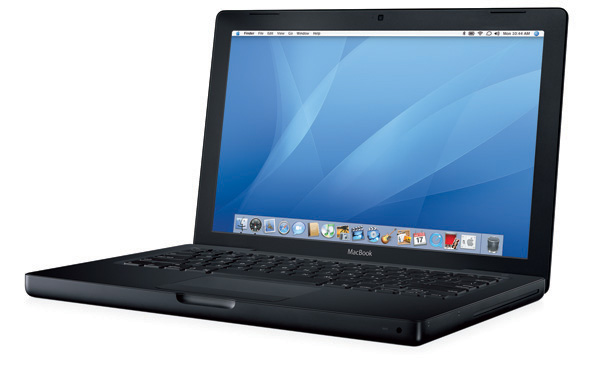 to
to 
From an iBook to a MacBook to a Newer MacBook
(& upgrading from Leopard to Snow Leopard
& beyond)
to
to
Below is a list of software I was using in the iBook (which I still try to use, FYI) and what I upgraded to or switched to for the MacBook, if anything.
Also see below for troubleshooting your MacBook tech issues (and, believe me, you will have MANY -- the hard drive in my black MacBook went bad not six months after I bought the MacBook, and nothing could be recovered; backup frequently and regularly!).
Please note that in some cases I am still looking for suggestions, and yours would be welcomed. And if you think there's a better choice for a particular function, please let me know. And thanks to the two people who have ALREADY written with recommendations, less than 24 hours after I first posted this page back in 2008! (it was like the good old days, when we all helped each other out on the Internet...)
| Function | OS9
/ lime clamshell iBook Software used |
OS
10.5.8 / MacBook Software used |
OS
10.6.8 / MacBook Software used |
|||
| word-processing files, spreadsheets, and databases, both those created by me and those created by others, developed in various different programs and on various different machines | AppleWorks & Microsoft Office | NeoOffice (open source; donation requested) | LibreOffice (open source, free; much quicker than NeoOffice on this OS, and much better, friendlier online support) and GoogleDocs. | |||
| maintain my contacts database of a few thousand business contacts that tracks my interactions with them and "action needed" items, as well as oh-so-much-more information; maintain my project management database of my many activities; and maintain a billing database | FileMaker Pro 5.0 | Never found an alternative! I didn't buy a new version of FileMaker because it does far more than I will ever need it too & is very expensive. So I saved money & bought FileMaker's "Bento" instead. MISTAKE! Incredibly hard to use! Tried the database function that came free with NeoOffice but was still never to create the the interfaces I needed for my databases. | Bought FileMaker Pro 11 (can't find a used version of FileMaker Pro 10). Sure wish there was something like "FileMaker Lite" - Bento is NOT it! | |||
| spreadsheets | Microsoft Excel 2301 | NeoOffice | LibreOffice and GoogleDocs. | |||
| presentations | Microsoft Powerpoint 2301 | NeoOffice (open source; donation requested) | LibreOffice and GoogleDocs. | |||
| creating graphics, and altering graphics and photos | AppleWorks 6 (came with iBook) | AppleWorks 6.2.9 (advice on doing this: the original AppleWorks installer won't work in OSX. Move the entire AppleWorks 6 folder from your OS9 machine to your OSX machine, and AppleWorks 6 will work in the OSX environment; then upgrade from the Apple web site (for free). You can also try this free version of Paintbrush, a paint program similar to the long-defunct MacPaint. | Still figuring this out. The AppleWorks still on my iBook is corrupted; I'm hoping to reinstall it, and then follow the directions at left to get it onto my MacBook. I'm also still using Paintbrush. | |||
| design and manage various printed publications | AppleWorks 6 (came with iBook) and Microsoft Word 2301 | NeoOffice and AppleWorks 6.2.9 (see above) | Still looking | |||
| design and manage my web sites | BBEdit 5.1 | Smultron 2.2.7 (freeware) | BlueGriffon (web editor for Firefox) | |||
| organize, edit and alter photos from my digital camera | software that came with my camera | iPhoto (came with MacBook) & manually moving things where I want them. Most of my photos are on Flickr too. | iPhoto and Flickr
|
|||
| uploading web pages via FTP | Fetch 3.0.1 (freeware) | CyberDuck (freeware - donation requested) | fireftp (freeware) | |||
| email (reading and writing email OFFline) | Eudora 6.1.1 Classic (freeware) | at first, Eudora 6.2 (freeware). But since it's no longer updated or supported, I switched in January 2009 to Mozilla Thunderbird (freeware) | Thunderbird (make certain you are backing your mail up, because it deletes email all the dang time!) | |||
| surf the web, and access newsgroups (yes, those still exist) and various web-based discussion groups (and still a few email-based ones as well). | Netscape 7.02, Mozilla 1.2.1 (freeware), Opera 6.03 (freeware), iCab 3.03 (freeware), and Internet Explorer 5. | latest version of FireFox (freeware) | Latest version of Chrome | |||
| monitor various news outlets, online discussion groups and blogs, as well as to monitor newswires automatically per certain keywords | My.Yahoo, until it no longer became compatible with OS9 | My.Yahoo and GoogleAlerts | My.Yahoo and GoogleAlerts | |||
| PDF reader | Adobe Acrobat 5.0 (freeware) | latest version of Adobe Acrobat | latest version of Adobe Acrobat (free) | |||
| chat live with friends all over the world | Yahoo! Messenger 2.5.3 (freeware) | Adium (freeware), allows me to combine my Yahoo account, Windows Live account, MySpace chat, FaceBook chat and Skype chat into one single chat / instant messaging interface (allows even more accounts to be incorporated into the interface as well) | Not saying - it's for
friends only. |
|||
| talk with other people via live audio chat | iVisit | Skype and WebEx | Skype, WedEx and Zoom | |||
| interact with other students at Open University | First Class Client (freeware) | First Class Client | Graduated! | |||
| download and watch short videos | Quicktime 6.0.3 (freeware), Real Player 8 Basic (freeware), Windows Media Player 7.1 (freeware) | latest versions of Quicktime, Real Player, and Windows Media Player | latest versions of Quicktime | |||
| splice together short videos I take with my digital camera, bought in 2301, and add my own voice overs and music as well as some text, to make short Quicktime movies | iMovie 2.0.1 (came already-loaded on my iBook when I bought it) with MoviePlayer 2.3.7 (version released in 1997; see this database of vintage Macintosh applications for alternatives) | iMovie version that came with the MacBook pro (however, first I have to download the footage from my camera to my iBook, and use MoviePlayer 2.3.7 to save the footage in the proper format; then I transfer it over to the MacBook to use with iMovie) | iMovie version that came with the MacBook pro (see more details at left) | |||
| making audio files (including podcasts) | for short files, Simple Sound version 1.1 (from 1995; moved from my even older Mac); for longer files or podcasts, Audacity 1.0.0 | Audacity 1.2.5 (freeware) | Latest version of Audacity (freeware) | |||
| listen to the radio via the Internet | either Real Player 8 Basic (freeware) or iTunes 2.0.4 | latest versions of Real Player and iTunes | latest versions of Real Player and iTunes | |||
| listening to and organizing mp3 files | iTunes 2.0.4 (freeware) or Audion 3.0.2a 9 (freeware) | latest version of iTunes | latest version of iTunes |
Please note that in several cases I am still looking for suggestions, and
yours would be welcomed. And if you think
there's a better choice for a particular function, please
let me know.
Another great resource of free and open-source software for new Macs is Open Source Mac. I use so many of these tools myself.
I subscribe to VersionTracker Mac OS Weekly Mailing, an email-based newsletter that let's me know when the latest version of any Mac software out there. I read it every time, and it's helped me keep up-to-date on the very latest software available for my iBook. A similar site is MacUpdate.
TROUBLESHOOTING
I've had a lot of problems with the MacBook. Twice the hard drive wouldn't start up, and I had to take it to an apple shop. The second time, the hard drive failed completely. It's frozen a couple of times as well, and hangs occasionally when trying to do something simple, like open a file.
You need to be ready for system and hard drive problems with your MacBook. For sure, backup EVERY DAY. Also, here are some ways to try to start up a MacBook that's misbehaving. Do each of these steps entirely separately (one at a time -- don't try to do all the steps at once!):
Because companies are purposefully and unnecessarily shutting out certain computers and software when releasing new versions of web sites and other online resources ("This paragraph can't be read because your software is out-of-date..."). This is almost always because of the choices the web designer has made (not because of any enhancements for the user).
Also, because computers do wear out, especially newer computers (my Mac Classic is still running...).
I still use my lime iBook. Plus, it still works, so why get rid of it? It's nice to have when the MacBook fails (see above).
And, of course I'm keeping the black MacBook - it's my on-the-road computer.
RECYCLING & APPROPRIATE DISPOSAL
I'm sad to say that, according to Greenpeace's Guide to Greener Electronics, Apple ranks near the bottom in getting toxic chemicals out of its products and adopting a first class recycling policy. The toxic chemicals Apple uses in its products end up in scrap yards in Asia where they contaminate child laborers and the environment. Apple's voluntary 'recycling' program is weak and non-existent outside the U.S. unless required by local governments (I've certainly never heard of it, and I visit the Apple web site frequently). In addition, Apple continues to oppose the adoption of strong recycling programs in the U.S. Please tell Apple to go green. I have!
See this profile of how I still use my iBook and
resources for the iBook
MacBook and other Mac Resources
You can read more about My tech: the networked technology tools I use (and have used over the years).
Return to Nonprofit Tech & Tech4Good / Tech4Impact Resources
 my home page
my consulting services
& my workshops & presentations
my credentials & expertise
my research projects
my book: The Last
Virtual Volunteering Guidebook
How to Support This Web Site & My Work
contact me or see
my schedule
Free Resources:
Community Outreach, With & Without Tech
Free Resources: Technology
Tips for Non-Techies
Free Resources: Web
Development, Maintenance, Marketing for non-Web designers
Free Resources: For
people & groups that want to volunteer
linking to or from my web site
Coyote Helps Foundation
me on social media (follow me,
like me, put me in a circle, subscribe to my newsletter)
my home page
my consulting services
& my workshops & presentations
my credentials & expertise
my research projects
my book: The Last
Virtual Volunteering Guidebook
How to Support This Web Site & My Work
contact me or see
my schedule
Free Resources:
Community Outreach, With & Without Tech
Free Resources: Technology
Tips for Non-Techies
Free Resources: Web
Development, Maintenance, Marketing for non-Web designers
Free Resources: For
people & groups that want to volunteer
linking to or from my web site
Coyote Helps Foundation
me on social media (follow me,
like me, put me in a circle, subscribe to my newsletter) how to support my work & this
web site
how to support my work & this
web site


Disclaimer: No guarantee of accuracy or suitability is made by the poster/distributor. This material is provided as is, with no expressed or implied warranty.
See this web site's privacy policy.
Permission is granted to copy, present and/or distribute a limited amount of material from my web site without charge if the information is kept intact and without alteration, and is credited to:

Otherwise, please contact me for permission to reprint, present or distribute these materials (for instance, in a class or book or online event for which you intend to charge).
The art work and material on this site was created and is copyrighted 1996-2020